If your e-mail has been verified you can’t just change it. For security reasons you have to confirm your current and your new e-mail address. Follow the step below:
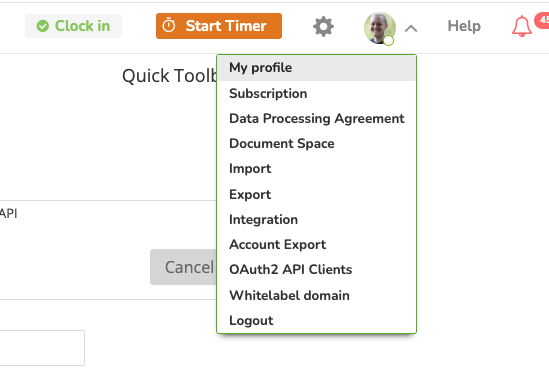
- Navigate to “My profile” by clicking on the dropdown at your avatar:
2. On your profile, click on “Change email”. If you don’t see it, user are not allowed to change their own email address in zistemo. If so, please contact an admin. 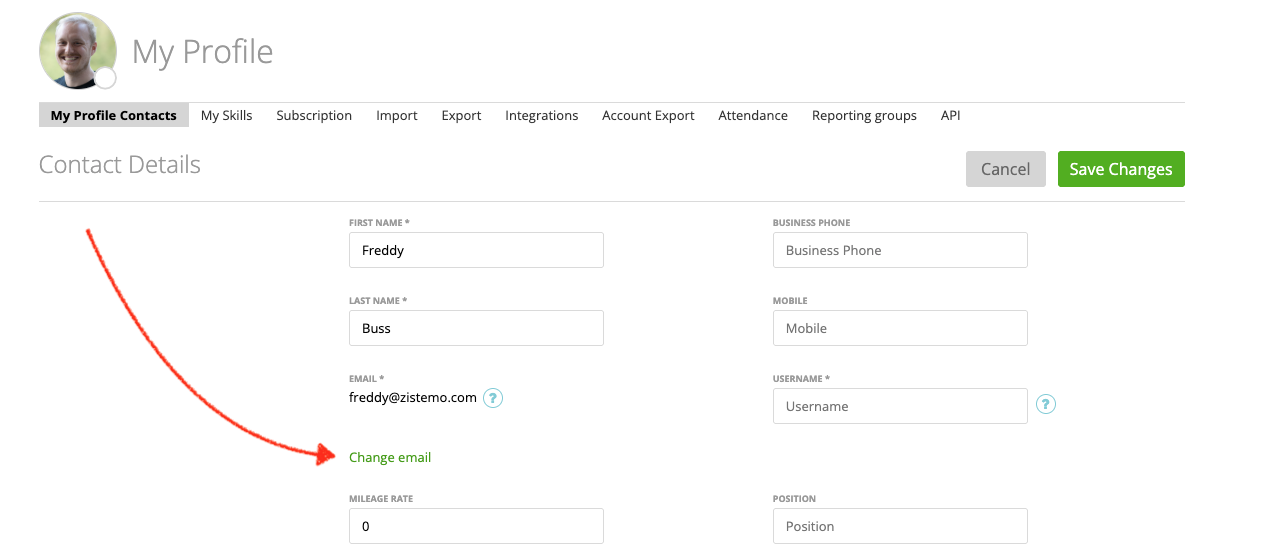
3. Insert the insnew email address and your current password that you are using to login to zistemo and click on send emails

4. You’ll a confirmation email to your current email address and to your new email address. Please click on “Confirm Email Address” on both emails within 15:00 minutes. 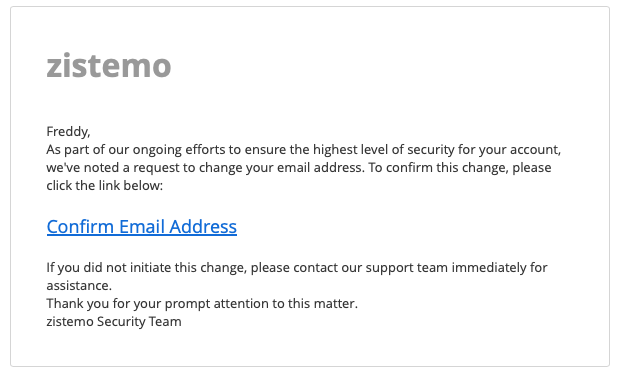
What happens if I don’t confirm both email addresses within 15 minutes?
If you don’t confirm your email addresses within 15 minutes nothing will happen. Your email won‘t be changed. You can start that process any time again.
I received a conformation email but I didn’t initiate the change
If you did not initiate the change please ask users with admin roles if they want to change your email address. If nobody in your company initiate to change your email address please update your password immediately and enable two factor authentication.
I don’t have access to my old email address
Ask your IT department if your email address can be anyhow restored. Usually in business, they set up an email forward from your old email address.